
Track All Packages in One Place A Practical Guide
Absolutely. You can track all packages in one place—and you should. Tools like Instant Parcels are designed for this exact purpose. They pull in tracking data from all the major players—FedEx, USPS, DHL, you name it—and organize it into one straightforward dashboard. No more juggling a dozen websites just to see where everything is.
The End of Tracking Chaos: Why Centralizing Shipments Matters
We’ve all been there: a dozen browser tabs open, trying to figure out which tracking number belongs to which carrier. You're digging through old emails, searching for that one crucial update. Whether you're a frequent online shopper or a growing e-commerce store owner, that scattered approach is more than just annoying—it's a massive time sink.
Why a Unified View Is No Longer a Luxury
Trying to keep up with shipments manually just doesn't scale anymore. The numbers are staggering: by 2025, the world is expected to ship 217 billion parcels globally, a jump from 185 billion in 2023. That works out to nearly 5,900 packages being delivered every single second, mostly thanks to e-commerce.
For both shoppers and sellers, this explosion in volume creates a headache. You're left navigating a messy web of different carriers, each with its own system. You can learn more about global package tracking software trends and what they mean for the industry.
A universal tracking solution cuts right through that clutter. Instead of just reacting when a customer asks, "Where's my order?" you can see the status of every single package from one command center.
This shift is a game-changer:
- You save serious time. No more logging into five different carrier websites.
- It reduces the stress of the unknown. A quick glance tells you where everything is and its ETA.
- It elevates your customer service. For businesses, a single, reliable tracking link is one of the best ways to reduce support tickets.
The real power of a centralized tracker isn't just seeing where a package is now; it's about reclaiming control and peace of mind over the entire delivery journey. It simplifies a complex process into a single, manageable workflow.
To really illustrate the difference, let's break down the old way versus the new way.
Manual Tracking vs. Unified Tracking: A Quick Comparison
| Feature | Manual Tracking (Multiple Websites) | Unified Tracking (Centralized Platform) |
|---|---|---|
| Visibility | Fragmented, requires checking each carrier site | All shipments visible on a single dashboard |
| Time Spent | High; involves searching for numbers and logging in | Low; updates are automatic and centralized |
| Notifications | Inconsistent; depends on each carrier's system | Customizable and consistent across all carriers |
| Customer Support | Reactive; you find out about delays when a customer calls | Proactive; you can spot issues before they become problems |
| Carrier Support | Limited to whoever you're shipping with that day | Supports hundreds of carriers automatically |
The table makes it pretty clear. The old, manual method is inefficient and prone to error, while a unified system gives you the clarity and control you need.
Ultimately, centralizing your shipments is about making the post-purchase experience feel effortless. It lets you track all packages in one place, turning a tedious chore into a simple, automated process.
Your First Step: Gathering Your Tracking Numbers for a Unified View
Before you can get that bird's-eye view of all your shipments, you have to get your tracking numbers in one place. This isn't about fancy software; it’s about building a simple, repeatable habit to make sure no package—whether it's a personal order or a critical business delivery—slips through the cracks.
The good news? Tracking numbers are everywhere. They're in your order confirmation emails, they pop up in SMS alerts, and they live inside your customer account on sites like Amazon or Shopify. The real challenge isn't finding them; it's corralling them so they're ready when you need them.
Without a system, you'll find yourself constantly digging through old emails and messages, wasting time just to get a simple update. The goal is to create a central spot where you can quickly stash these codes as they come in.
How to Collect Your Numbers Without the Headache
Honestly, the best methods are usually the simplest.
For example, a quick email filter can do most of the work for you. In Gmail or Outlook, you can create a rule that automatically flags any email with phrases like "shipped," "tracking number," or "on its way" and sends it to a dedicated "Tracking" folder. Just like that, you have a self-organizing list ready to go.
What about when you're on the move? A basic notes app on your phone is perfect. When a tracking number pops up on a retailer's app, just copy and paste it into a single note. It takes two seconds and saves you from hunting down that information later.
A consistent workflow, no matter how basic, is the key to effortless tracking. The goal is to make gathering your tracking numbers a reflex, not a research project. This discipline is what makes a universal tracking dashboard truly powerful.
These little habits really add up, saving you precious minutes on every single package. The trick is to find a method that feels natural to you and just stick with it. If you ever get stuck, our guide on how to find your tracking number has a ton of examples for different stores and carriers.
Ultimately, your collection system should be fast and frictionless. Think of it as the prep work that makes a tool like Instant Parcels so powerful. Once your numbers are gathered, you're just one step away from seeing every shipment on a single, clean timeline.
Using a Universal Tracker to Unify Your Deliveries
Alright, you've rounded up all your tracking numbers. Now for the fun part—turning that jumble of codes into a single, clean dashboard. This is where the magic really happens, and you get to see just how powerful it is to track all packages in one place.
The best feature of a good universal tracker is its auto-detection. You don't need to know if your package is with UPS, DHL, or some obscure regional carrier. Just copy and paste the tracking number into the search bar, and the system figures it out for you. It’s a small thing, but it completely removes that initial guesswork and the hassle of hopping between different carrier websites.
From Chaos to Clarity: The Dashboard Experience
Once you've plugged in a few numbers, your tracking dashboard starts to take shape. Instead of a mess of open browser tabs, you get an organized list of every single shipment you’re expecting. It's incredibly satisfying to see a personal order from Amazon, a critical freight shipment for your business, and a gift from a friend overseas all lined up on one screen, each with its status clearly marked.
This simple workflow is the key to getting a unified view of all your incoming deliveries.
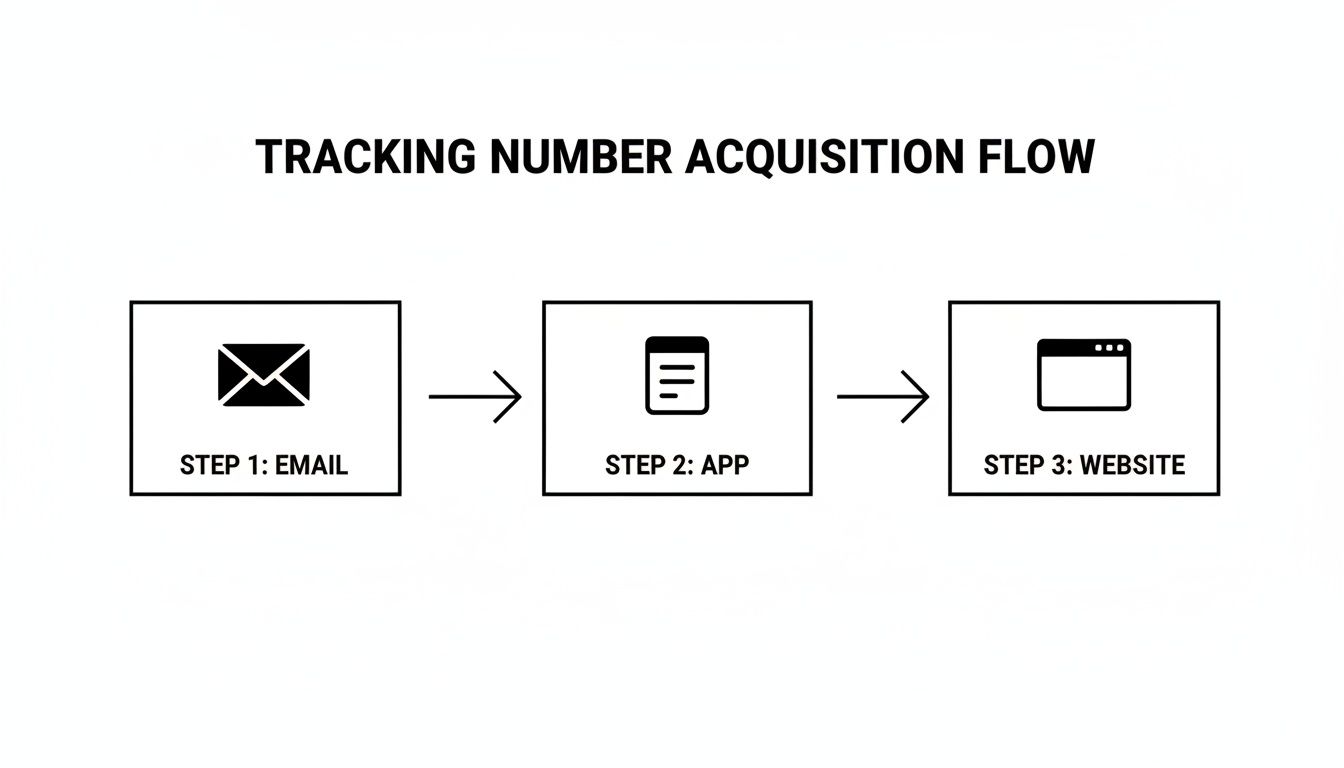
The flowchart above shows how tracking numbers from all over the place—emails, shopping apps, and retailer websites—can all feed into one central hub.
On a good dashboard, you’ll typically get a quick snapshot of each package, including:
- Current Status: Is it "In Transit," "Out for Delivery," or "Delivered"?
- Location History: A step-by-step log of every scan from origin to your doorstep.
- Estimated Delivery Date: The latest ETA from the carrier, so you know when to expect it.
This kind of organization is becoming less of a luxury and more of a necessity. With North America alone making up a huge 38.5% of the global package tracking market, the volume is staggering. Projections show U.S. parcel shipments could reach 24 billion by 2025, which makes a unified platform essential for anyone trying to stay on top of it all.
A Single Source of Truth in Action
Let’s paint a picture. Imagine you’re waiting on three different items: a new laptop from Dell (shipped via FedEx), a book from an independent seller (using USPS), and a palette of supplies for your business (coming via a freight carrier).
Without a central tracker, you’d be checking three separate websites. With one, you just log in and see everything at a glance. The laptop is out for delivery today, the book just left a sorting facility two states away, and your freight shipment has officially cleared customs. That's total situational awareness in seconds. When you're choosing a tool, make sure it provides comprehensive tracking information without making you dig for it.
The real value of a universal tracker is its ability to standardize complex logistics data. It translates the unique language of each carrier into a simple, consistent format, giving you a clear and actionable overview of everything headed your way.
Ultimately, a centralized dashboard is more than just a list. It’s a command center that gives you control and peace of mind, transforming the often-chaotic waiting game into a predictable and streamlined experience. You can see how our universal package tracker pulls all of this together.
Taking Tracking to the Next Level: Pro Features for Businesses and Power Users
Once you've got all your packages funneling into one place, you can stop just reacting to delivery updates and start using tracking as a genuine strategic tool. This is where a basic tracker evolves into a full-blown command center, saving you heaps of time or creating some serious operational wins for your business.
Think of it like having a personal logistics assistant. Instead of scanning a long list of shipments every morning, you can flag the ones that truly matter. Maybe you're waiting on a critical replacement part to get a machine back online, or a time-sensitive document for a client. You can "save" or "watch" that shipment, pinning it right to the top of your dashboard. This way, the important stuff never gets lost in the shuffle.
Let Custom Alerts Do the Heavy Lifting
The real game-changer is setting up custom notifications. Why constantly pull information when you can have it pushed to you the moment it matters? Instead of hitting refresh, you can build alerts around specific delivery milestones.
Let me give you a couple of real-world examples:
- For a personal package: I always set an SMS alert for when a package is "Out for Delivery." It’s a simple thing, but it means I know exactly when to listen for the doorbell, which helps prevent those dreaded missed delivery slips or, worse, porch pirates.
- For an e-commerce business: You could set up an email notification that fires off to your support team anytime a shipment gets a "Delivery Exception." This lets your team proactively jump on the problem and contact the customer—often before the customer even knows there's an issue.
These automated pings keep you in the loop without demanding your constant attention. You just set the rules once, and the system takes over, freeing up your time and mental space for more important things.
The whole point of advanced tracking is to shift from being reactive to proactive. It’s about anticipating what you (or your customers) will need and using automated information to stay one step ahead of the delivery game.
Wow Your Customers with Shared Tracking
If you run a business, you know the post-purchase experience is everything. And what’s the number one question your support team gets? "Where is my order?" An advanced tracking platform gives you the perfect answer: a shared, live tracking link.
Instead of just flicking over a static tracking number in an email, you can send customers to a branded, easy-to-follow tracking page. It’s a small touch, but it’s huge for the customer experience. It empowers them with real-time info and can slash the number of support tickets you get. More importantly, it builds trust and shows you’re transparent from the moment they click "buy" until the package is on their doorstep.
This isn't just a nice-to-have feature; it's becoming the standard. The demand is so high that the tracking as a service market, valued at USD 9.96 billion in 2025, is expected to explode to USD 41.55 billion by 2034. You can dig into the numbers yourself in this in-depth market analysis.
When you start using features like these, you’re doing more than just organizing your shipments. You’re building a smarter, more customer-focused operation. You're turning a simple tracking number into a powerful tool for communication, proactive problem-solving, and a much better customer experience.
Tackling International Shipments and Common Headaches
Let's be honest: international shipping can feel like a complete black box. Once a package leaves the country, you're often left wondering where it is and who has it. This gets especially tricky when carriers hand off packages, like when DHL in Germany passes a parcel to USPS for the final leg in the United States.
If you're trying to track this manually, you'd have to dig for the new, local tracking number and start your search from scratch. It's a pain. A universal tracker that lets you track all packages in one place completely sidesteps this problem. It automatically detects the handoff and stitches both legs of the journey into one clean, continuous timeline.
Decoding Confusing Tracking Updates
International tracking statuses are notoriously vague. Seeing "In Transit" for the tenth day in a row doesn't exactly tell you much. Here's what some of the most common (and frustrating) statuses actually mean from my experience.
- Held at Customs: This is the big one and the most common reason for a delay. Your package is waiting to be inspected by the destination country's customs officials. They're checking for compliance, calculating duties, and assessing taxes. This can be quick, or it can take weeks.
- Arrival at Inward Office of Exchange: Think of this as the welcome mat. Your package has landed in the destination country and is at a huge international mail facility. It's the first stop before it's routed into the local delivery system.
- Item Presented to Import Customs: This just means your package is next in line for review. It’s a standard, procedural update showing it's actively moving through the customs queue.
My best advice for international shipping? Be patient. Carrier transfers and customs reviews are just part of the game. A good universal tracker offers real peace of mind by showing you exactly which stage your package is in, even when it seems like nothing is happening.
What to Do When Your Tracking Goes Dark
It’s definitely unnerving when a tracking number stops updating for days on end, but it’s not always a sign that your package is lost. If a domestic shipment has been static for more than 5-7 business days, it's probably time to take action. I always recommend contacting the seller first—they have the direct relationship with the carrier and can launch an official investigation much faster than you can.
For more complicated logistics, like bulk international freight, understanding who's responsible for what is crucial. This is where you might find yourself leveraging a freight forwarder for Amazon FBA to handle the complex journey. When problems pop up, knowing the entire shipping chain helps you figure out who to call.
For a deeper dive, check out our guide on how to track international packages and troubleshoot common problems.
Got Questions? We’ve Got Answers.
Jumping into a new system for tracking your packages can bring up a few questions, even with the best guide. It's totally normal. Let's walk through some of the most common things people ask, so you can get comfortable managing all your shipments in one spot.
I Have a Tracking Number, but No Idea Who the Carrier Is. Help?
You've come to the right place. This is exactly what a universal tracker is built for.
Forget playing detective and cycling through a dozen carrier websites. Just copy and paste that tracking number into a platform like Instant Parcels, and its auto-detection technology does the heavy lifting. It scans its massive database of global carriers in a split second to pinpoint the right one. Problem solved.
How Reliable Is the Tracking Data from a Third-Party App?
This is a great question. You can trust the information because a good universal tracker doesn't create its own data—it pulls it directly from the source.
These platforms connect to carrier systems through official APIs, meaning the "In Transit" or "Delivered" status you see is the same real-time information you’d find on FedEx's or DHL's own site. The magic isn't in changing the information, but in bringing it all together. You get consistent, standardized updates from all your shipments on a single, clean dashboard.
A universal tracker is your single source of truth. It consolidates official carrier data into one easy-to-read view, giving you the most accurate information without having to hop between different websites.
Is It Secure to Put All My Tracking Numbers in One Place?
Absolutely, as long as you're using a reputable platform. It's important to remember that tracking numbers themselves are not sensitive information.
They don't contain your name, address, or credit card details. A tracking code is just an identifier for a package moving through the logistics network. Secure services like Instant Parcels are built with privacy in mind and don't need access to your personal accounts or order details to do their job.
My Package Hasn't Updated in Days. What Should I Do?
First off, don't panic. This happens more often than you'd think, and there's usually a simple explanation.
The first thing to check is the shipping method. If you opted for an economy or standard service, you'll often see fewer scans. Carriers skip some of the in-between updates on these services to keep costs low.
For international shipments, it's also common to see a pause in tracking. Packages can seem to go dark for a few days while they're clearing customs or being handed over from one country's postal service to another.
If you're looking at a domestic shipment that hasn't budged for more than 5-7 business days, it’s time to act. My professional advice? Contact the seller or retailer first. They have a direct line to the carrier and can launch an official investigation far more effectively than you can. They have access to behind-the-scenes tools that can get a real answer about where your package is.